Complete firstUser problem
Scenario, audience and relevant findings are available.
Without a need, critique becomes a matter of taste.
A practical method guide: clarify prerequisites and materials, understand the complete process, and look up outputs, pitfalls, and stop criteria.
What needs to be finished first
Scenario, audience and relevant findings are available.
What needs to be ready before start
Paper, thick pens, scenario, criteria and space for multiple sketches.
Cross-functional team, facilitator and user-knowledge representative.
Prepare a visible scenario, need, constraints and criteria; drawing skill is not required.
60–120 minutes; user testing separately
Display the brief; give everyone equal sketching time and space for alternatives and critique.
The one question this method answers
Which design best addresses the concrete user problem and what do alternatives teach us?
Phases with goal, actions, output and pitfall
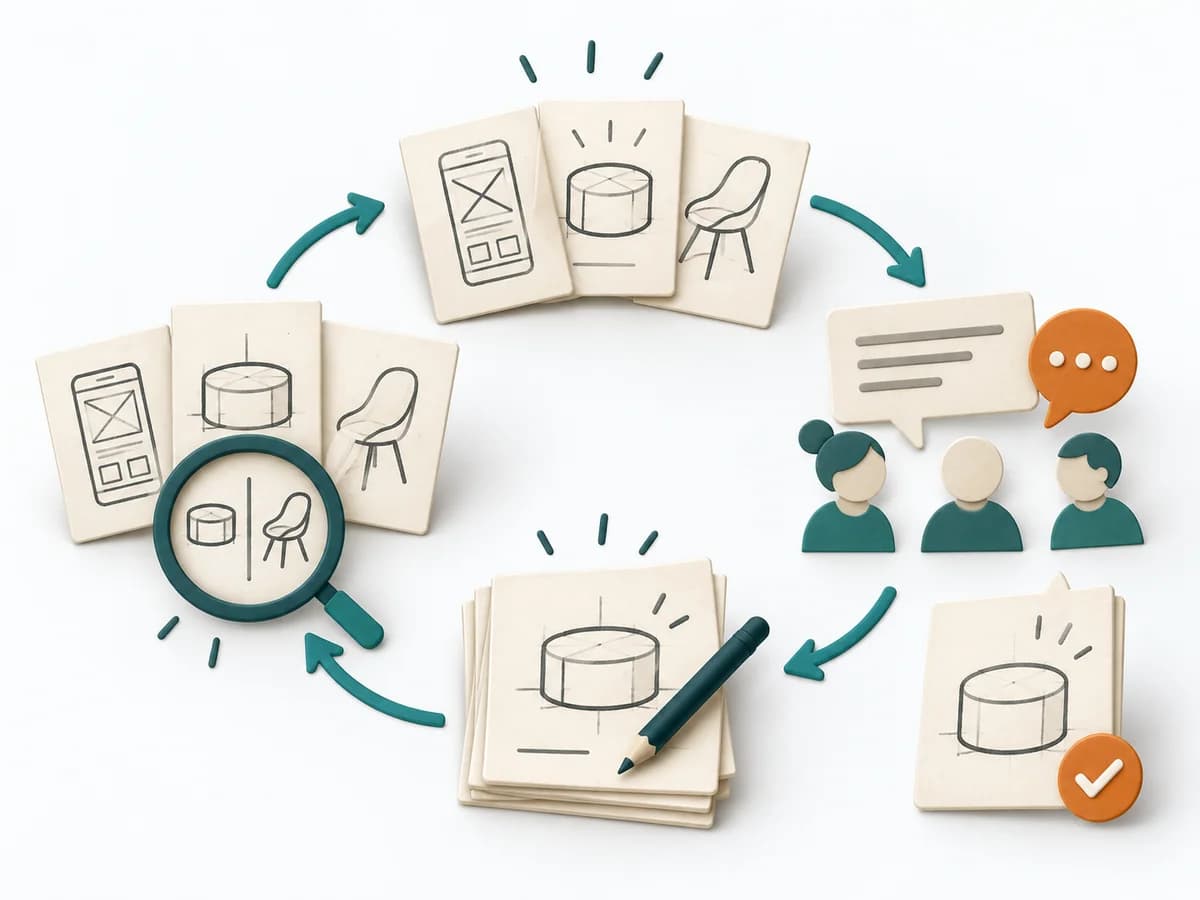
Design Studio combines individual sketching with brief presentation, goal-based critique and redesign. Several concepts are developed in parallel before useful elements are combined into a new variant.
Fictional example
Design Studio combines individual sketching with brief presentation, goal-based critique and redesign. Several concepts are developed in parallel before useful elements are combined into a new variant.
Which scenario and goal bound the sketches?
Fictional: a mobile user needs to find and reserve a suitable evening course.
Describe or sketch at least two different approaches with flows.
A: filtered list with immediate reservation. B: guided selection by date and interest.
What strength, weakness and open question follow for each concept?
A shows many options quickly but may overwhelm. B limits choices but hides available dates.
Which elements are combined and how does the new flow work?
First select available evenings, then show a short filtered list with visible dates and reservation.
Which uncertain assumption is tested through which observable behaviour?
Can a new user reserve a course at a suitable time without help? Lea builds a paper prototype and observes the flow.
All example details are fictional and illustrate the application.
Briefing
Goal
Shared design brief
Inputs for this step
Actions
Output
Shared design brief
Can everyone restate the user goal?
Quality check
Can everyone restate the user goal?
Pitfall
The brief already contains the desired screen. Return to the need and keep solutions open.
Timing: 10–15 minutes
Sketching
Goal
Sketch alternatives
Inputs for this step
Actions
Output
Sketch alternatives
Are there different approaches rather than only layout variants?
Quality check
Are there different approaches rather than only layout variants?
Pitfall
One person draws while everyone else comments. First allow parallel individual work with equal time.
Timing: 10–20 minutes
Critique
Goal
Annotated concepts
Inputs for this step
Actions
Output
Annotated concepts
Does critique address user goal and criteria?
Quality check
Does critique address user goal and criteria?
Pitfall
Defensiveness and taste debates consume the time. Name the design’s expected effect and direct clarification to the next iteration.
Timing: 15–30 minutes
Redesign
Goal
Revised concept
Inputs for this step
Actions
Output
Revised concept
Is the revised concept internally coherent?
Quality check
Is the revised concept internally coherent?
Pitfall
Every suggestion is combined without coherence. Walk through the user journey again and remove unnecessary elements.
Timing: 15–25 minutes
Learning test
Goal
Prototype test brief
Inputs for this step
Actions
Output
Prototype test brief
Is the selection marked as a hypothesis to test?
Quality check
Is the selection marked as a hypothesis to test?
Pitfall
Internal agreement counts as user evidence. Plan a test with the actual audience.
Timing: 10–15 minutes
What comes out at the end
Sketch: what the artifact looks like
Multiple annotated sketches, traceable critique and revised concept with a test question.
Record date and scope; retain the previous version and reason when changing it.
Prepare a visible scenario, need, constraints and criteria; drawing skill is not required.
To be confirmed
To be confirmed
Complete cycle Time: 60–120 minutes; user testing separately
Complete this worksheet on paper or in your own document during the work.
Which scenario and goal bound the sketches?
...
Describe or sketch at least two different approaches with flows.
...
What strength, weakness and open question follow for each concept?
...
Which elements are combined and how does the new flow work?
...
Which uncertain assumption is tested through which observable behaviour?
...
Answer the prompts with your own information. Explicitly mark unknowns and assumptions.
NN/g: Facilitating an Effective Design Studio Workshop
Expected artifact: Shared design brief
Can everyone restate the user goal?
Entry:
...
Expected artifact: Sketch alternatives
Are there different approaches rather than only layout variants?
Entry:
...
Expected artifact: Annotated concepts
Does critique address user goal and criteria?
Entry:
...
Expected artifact: Revised concept
Is the revised concept internally coherent?
Entry:
...
Expected artifact: Prototype test brief
Is the selection marked as a hypothesis to test?
Entry:
...
...
Method guide: https://methodatlas.meierhoff-systems.de/en/methods/design-studio/run-sheet
Concrete filled scenario, fictional example
Fictional example for orientation. Counts and timings describe this case and are not universal requirements.
Concrete filled scenario, fictional example
Design brief: Fictional: a mobile user needs to find and reserve a suitable evening course.
Initial concepts: A: filtered list with immediate reservation. B: guided selection by date and interest.
Critique: A shows many options quickly but may overwhelm. B limits choices but hides available dates.
Revision: First select available evenings, then show a short filtered list with visible dates and reservation.
Test question: Can a new user reserve a course at a suitable time without help? Lea builds a paper prototype and observes the flow.
Recognize symptoms and steer against them
Quick overview, the full text is in the matching phase in the flow
The brief already contains the desired screen.
Return to the need and keep solutions open.
One person draws while everyone else comments.
First allow parallel individual work with equal time.
Defensiveness and taste debates consume the time.
Name the design’s expected effect and direct clarification to the next iteration.
Every suggestion is combined without coherence.
Walk through the user journey again and remove unnecessary elements.
Internal agreement counts as user evidence.
Plan a test with the actual audience.
When to pause, resolve prerequisites, or choose another approach
Go to the profile for purpose, similar methods, and sources or continue to the next method in the catalog.