Complete firstComparable subject
Set a comparable item set and included work; prepare buckets 1, 2, 3, 5, 8, 13, 20, 40, 100 and two known anchors.
Without a common frame, values are not comparable.
A practical method guide: clarify prerequisites and materials, understand the complete process, and look up outputs, pitfalls, and stop criteria.
What needs to be finished first
Set a comparable item set and included work; prepare buckets 1, 2, 3, 5, 8, 13, 20, 40, 100 and two known anchors.
Refined items, shared Done definition, ordered 1–100 buckets, reference items, and conflict pile
What needs to be ready before start
Refined items, shared Done definition, ordered 1–100 buckets, reference items, and conflict pile
Delivery team places · product owner clarifies · facilitator manages conflict pile
Set a comparable item set and included work; prepare buckets 1, 2, 3, 5, 8, 13, 20, 40, 100 and two known anchors.
30–60 minutes for 20–50 comparable items.
Prepare a workspace with Buckets · Anchors · Place · Correct · Close; separate example from live data.
The one question this method answers
Which relative size bucket fits each item when the team places in parallel, corrects once, and separates genuine conflicts?
Phases with goal, actions, output and pitfall
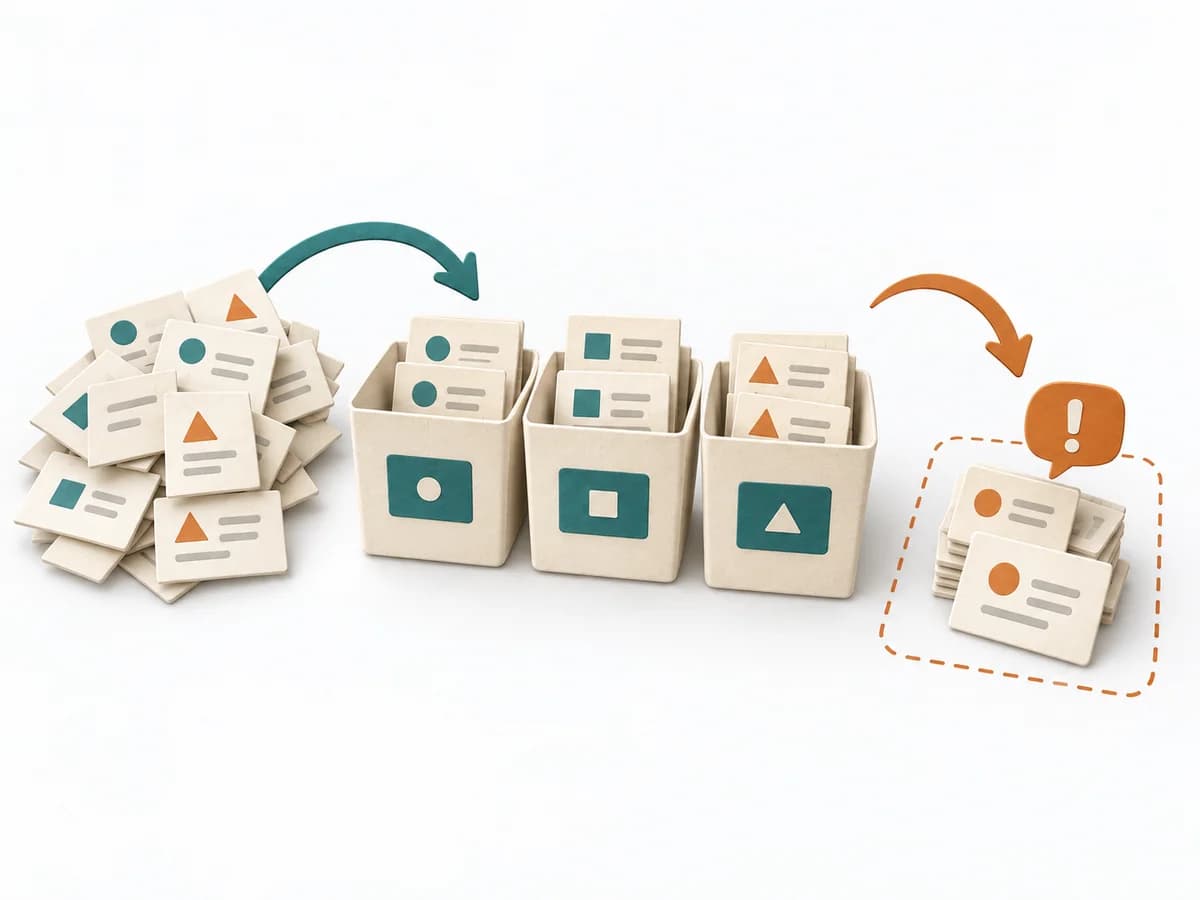
The bucket system uses fixed buckets as a shared scale and places tasks relative to one another. It sorts a large set quickly while reserving detailed discussion for disputed or marginal items.
Fictional example
Fictional values show the actual method fields.
| Item | Included | Anchor | First bucket | Move | Final | Follow-up |
|---|---|---|---|---|---|---|
| Delete tokenAdd evidence and rationale. | Build, test, rollout | Validation rule=3 | 3 | None | 3 | Ready |
| Save cardAdd evidence and rationale. | Build, test, security, rollout | Between 3 and 13 | 5 | 5→8; guest scope disputed | 5 without guests | Scope recorded |
| Provider migrationAdd evidence and rationale. | Auth, migration, fallback | Larger than 13 | 40 | None | 40 | Split into three items |
All values are fictional.
Buckets
Goal
Size lane: Explain the ordered bucket scale and shared meaning of relative size.
Inputs for this step
Actions
Output
Size lane
Explain the ordered bucket scale and shared meaning of relative size.
Quality check
Are scale, Done, and included work identical for everyone?
Pitfall
Buckets are read as hours or person-days. Define the scale explicitly relative to team anchors.
Timing: 5–10 minutes
Anchors
Goal
Bucket anchors: Place two known items together and calibrate remaining buckets relatively.
Inputs for this step
Actions
Output
Bucket anchors
Place two known items together and calibrate remaining buckets relatively.
Quality check
Are anchors completed, understood work?
Pitfall
A desired target item becomes the anchor. Use stable historical items with the same Done definition.
Timing: 5–10 minutes
Place
Goal
First placement: Distribute items; team members silently place one item at a time in a bucket.
Inputs for this step
Actions
Output
First placement
Distribute items; team members silently place one item at a time in a bucket.
Quality check
Does the pass remain fast and free of early debate?
Pitfall
Every placement starts an immediate debate. Place all items first and mark questions.
Timing: 10–20 minutes
Correct
Goal
Conflict pile: Others may move an item once; a second move request sends it to conflict.
Inputs for this step
Actions
Output
Conflict pile
Others may move an item once; a second move request sends it to conflict.
Quality check
Do different work models become visible without ping-pong?
Pitfall
Items move repeatedly between buckets. Allow one move, then clarify deliberately.
Timing: 5–10 minutes
Close
Goal
Bucket estimate: Resolve conflicts, split oversized items, and save anchors and assumptions.
Inputs for this step
Actions
Output
Bucket estimate
Resolve conflicts, split oversized items, and save anchors and assumptions.
Quality check
Are 40/100 items split and unclear items owned?
Pitfall
Large buckets enter an iteration unchecked. Split large work and recalibrate references with actual data.
Timing: 10–15 minutes
What comes out at the end
Sketch: what the artifact looks like
Rapidly calibrated backlog in relative buckets with anchors, conflict items, assumptions, and split/clarification actions.
Record date, team, data state, and review date; preserve prior versions.
Set subject, data, roles, flow, and review.
To be confirmed
To be confirmed
Practice run Time: 30–60 minutes for 20–50 comparable items.
Complete this worksheet on paper or in your own document during the work.
| Item | Included | Anchor | First bucket | Move | Final | Follow-up |
|---|---|---|---|---|---|---|
| Delete token | ||||||
| Save card | ||||||
| Provider migration |
The blank worksheet contains prompts only.
Reference · original teaching example
Expected artifact: Size lane
Explain the ordered bucket scale and shared meaning of relative size.
Entry:
...
Expected artifact: Bucket anchors
Place two known items together and calibrate remaining buckets relatively.
Entry:
...
Expected artifact: First placement
Distribute items; team members silently place one item at a time in a bucket.
Entry:
...
Expected artifact: Conflict pile
Others may move an item once; a second move request sends it to conflict.
Entry:
...
Expected artifact: Bucket estimate
Resolve conflicts, split oversized items, and save anchors and assumptions.
Entry:
...
...
Method guide: https://methodatlas.meierhoff-systems.de/en/methods/bucket-system/run-sheet
Concrete filled scenario, fictional example
Fictional example for orientation. Counts and timings describe this case and are not universal requirements.
Concrete filled scenario, fictional example
| Item | Included | Anchor | First bucket | Move | Final | Follow-up |
|---|---|---|---|---|---|---|
| Delete token | Build, test, rollout | Validation rule=3 | 3 | None | 3 | Ready |
| Save card | Build, test, security, rollout | Between 3 and 13 | 5 | 5→8; guest scope disputed | 5 without guests | Scope recorded |
| Provider migration | Auth, migration, fallback | Larger than 13 | 40 | None | 40 | Split into three items |
Recognize symptoms and steer against them
Quick overview, the full text is in the matching phase in the flow
Buckets are read as hours or person-days.
Define the scale explicitly relative to team anchors.
A desired target item becomes the anchor.
Use stable historical items with the same Done definition.
Every placement starts an immediate debate.
Place all items first and mark questions.
Items move repeatedly between buckets.
Allow one move, then clarify deliberately.
Large buckets enter an iteration unchecked.
Split large work and recalibrate references with actual data.
When to pause, resolve prerequisites, or choose another approach
Go to the profile for purpose, similar methods, and sources or continue to the next method in the catalog.